ROOM CREATION
Station Settings
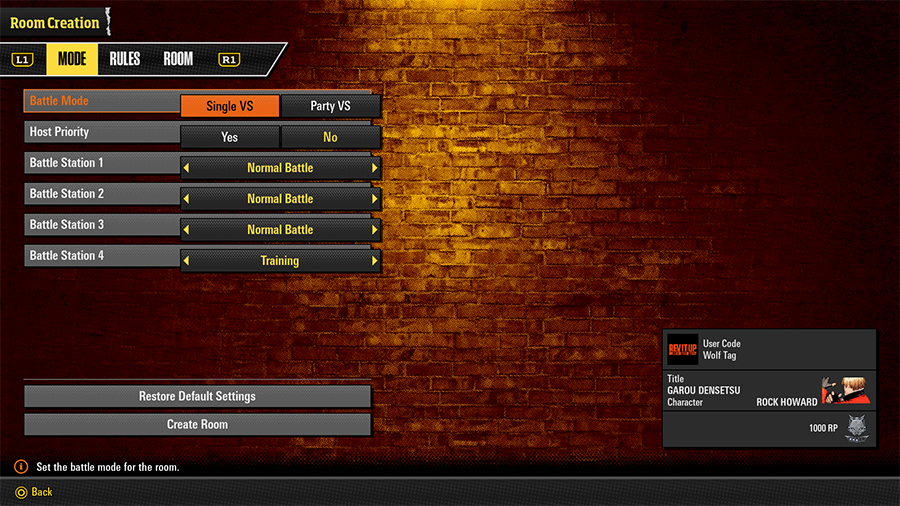
Customize battle station settings when creating the room.
Some options can also be adjusted after the room has been made.
Battle Mode
| Battle Mode | Single VS / Party VS | Set your battle mode preference. |
|---|---|---|
| Host Priority | Yes / No | Set whether to reserve a spot for the host. |
| Battle Stations: 1–4 | Regular Battle / Two-Lane Battle / Ring Out Battle / Training | Set the rules for battle stations. (Training cannot be selected in Party VS.) |
| Substitute | ON / OFF | Allows empty seats to be filled by substitutes when set to ON. (Only available in Party VS.) |
Rule Settings
| Rounds | 1 / 3 / 5 | Set the max number of rounds per match. |
|---|---|---|
| Round Time | 60 or 99 | Set the time limit per round. |
| Consecutive Battles | 1–10 / ∞ | Include selected consecutive battle count in search criteria. |
Room
| Room Members | 2–12 | Set the max room capacity. |
|---|---|---|
| Privacy Level | Public / Limited / Invite Only |
Set the room's privacy level. Limited: Entry will only be by invitation or Room ID search. Invite Only: Entry will only be by invitation. |
| Hide Room ID | Show / Hide | Set whether to show room IDs on-screen. |
| Region | All Regions / Same Region | Set whether to only let players from the same server region join the room. |
| Crossplay | ON / OFF | Set whether to show the room to users on other platforms. |
| Connection Speed | Any / Lv. 2–5 | Select a minimum connection speed. |
| Room Comments | - | Add a comment for the room. |
SEARCH
View rooms from around the world.
FRIENDS lets you see rooms that your friends have created.
Displayed rooms can also be sorted/searched by various criteria.
Sort
| Creation Time | Ascending / Descending |
|---|---|
| Connection Strength | Ascending / Descending |
| Rank | Ascending / Descending |
Search
| Search by Room ID | Search for a room by its unique ID. |
|---|---|
| Search by Wolf Tag | Search for a room by Wolf Tag. |
| Search by Criteria | Specify match settings and perform a search. |
| Search by Default Criteria | Search for a room using the default criteria. |
INVITED ROOM
A list of rooms you've received invitations for.
Rooms
Create online rooms and fight players without worrying about fluctuations in rank.
In these rooms, you can define the match rules however you like as you fight with other players to your heart's content.
Available Battle Modes
| SINGLE VS | Play one-on-one single matches. |
|---|---|
| PARTY VS | 3-on-3 team battles with up to six participants. Victory goes to the team with the most winners. Each player selects a character, then waits for their turn to fight. |
Creating Room Matches
Room Matches can accommodate up to 12 players.
Each room contains three battle stations and one training station by default. Take either the Player 1 or Player 2 side to signal that you're ready to play.
Head to Station Settings to customize the number of each station type.
While at a battle station you can stand by, enter the match queue, or spectate.
(The match queue only comes into effect when the station has no vacant spots.)
ROOM ID
A room's unique ID.
Enter this on the room search screen to look up (and join) a specific room.
Icons
| Icon | Name | Description |
|---|---|---|
 |
Sitting Icon | Indicates a player who is currently seated somewhere within the room. |
 |
Match Queue Icon | Indicates a player who is currently waiting in the queue. |
 |
Spectator Icon | Indicates a player who is currently spectating. |
 |
Fighting | Indicates a player who is currently battling. |
 |
Host | Indicates the host of the current room. |
Hosting Privileges
The host can modify the house rules for their room via the Station Settings menu.
Toggle host priority on to reserve the Player 1 side of a given station for the host.
Party VS
Party VS Rules
Party VS matches play out as team battles. Victory goes to the team with the most winners.
- Team Best of 3
Players split into two teams and fight for a single round each in the order of their team position.
At the beginning of each round, players trade places. The team with the most winning players on their side wins.
If a fight ends in a draw, that draw will be upheld and the next players will be brought in to fight as normal.
Substitutes
If substitutes are enabled, the match countdown begins when each team has at least one human player (and they declare that they're ready to play).
Once this countdown reaches zero, the game will assign seated players to vacant spots as substitutes.
Note: If substitutes are disabled, the match can only begin when each station spot (six in total) is occupied by a separate player.
Extra Round
An Extra Round occurs when the first and second players of either team both lose, but the third player wins theirs. In that case, both teams will enter an Extra Round, where the victorious third player will play bonus bouts against the opposing side's first and second players.
If the third player loses or draws in either bonus bout, the match will end immediately and the opposing team will be declared the winner.
But, if the third player beats both the opposing team's first and second players, the third player's team will be declared the winner in an upset victory.
Chat Box
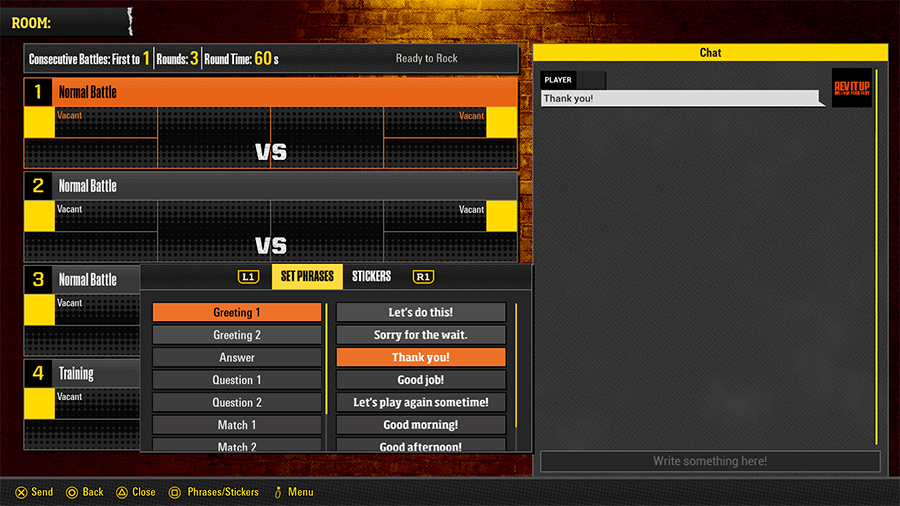
Communicate with other players using stickers and messages.
You can also open the chat box while spectating. Press △ to do so.