Xbox Wireless Controller
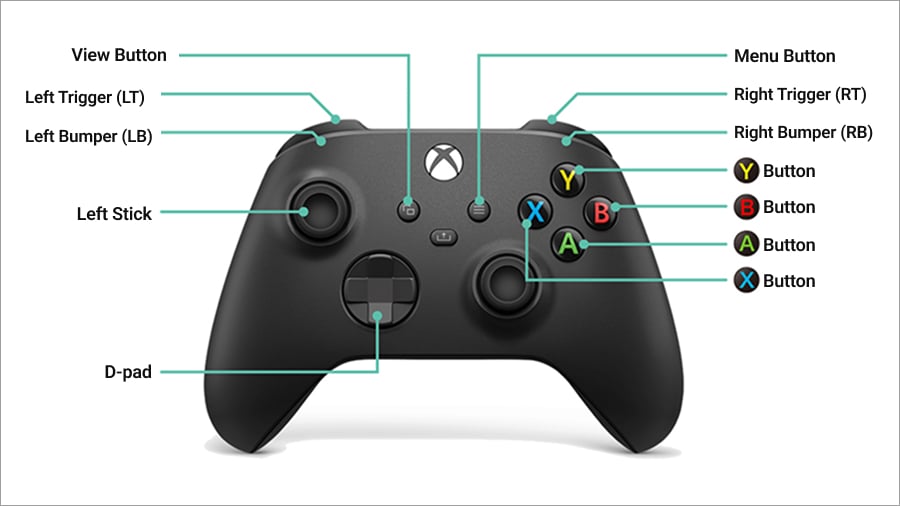
Selection Screen Controls (Main Menu, etc.)
| D-pad/Left Stick | Menu navigation |
|---|---|
| A Button | Confirm |
| B Button | Cancel |
| X Button | (Used on specific screens) |
| Y Button | (Used on specific screens) |
| LB | (Used on specific screens) |
| LT | (Used on specific screens) |
| RB | (Used on specific screens) |
| RT | (Used on specific screens) |
| View Button | (Used on specific screens) |
Combat Controls (Arcade Style)
* Default directions and buttons when the character is facing right (i.e. is on the Player 1 side).
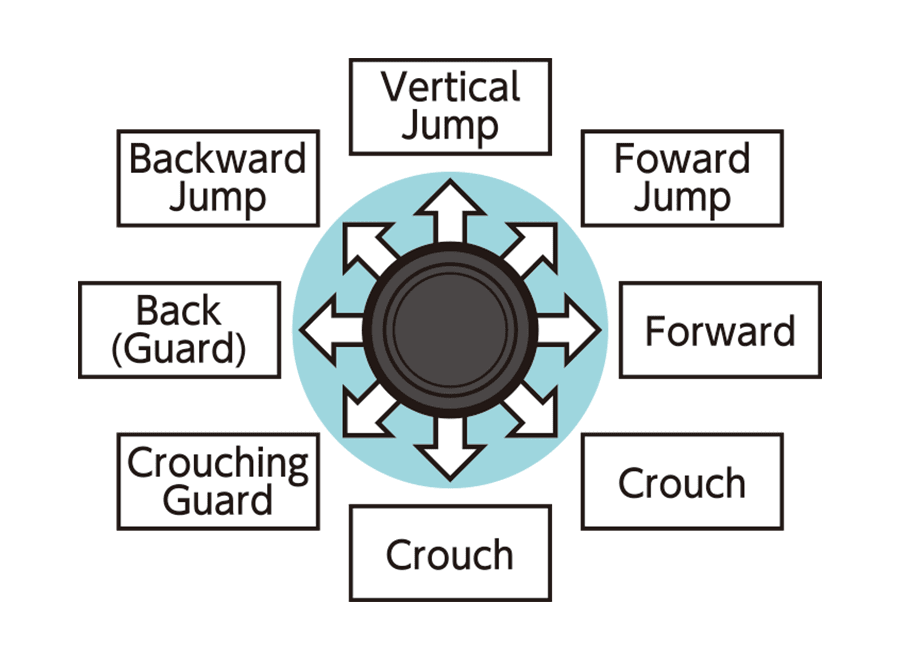
Directional Button/Left Stick Controls
Button Controls
| X Button | Light Punch |
|---|---|
| A Button | Light Kick |
| Y Button | Heavy Punch |
| B Button | Heavy Kick |
| LB | Light Punch + Light Kick (Throw) |
| LT | Light Kick + Heavy Kick |
| RB | REV Guard |
| RT | Light Punch + Heavy Punch |
| Menu Button | Display Pause Menu |
| Movement Controls | |
|---|---|
| Forward | → |
| Backward | ← |
| Crouch | ↓ |
| Dash/Step | →→ quickly or RB + → |
| Backstep | ←← quickly or RB + ← |
| Forward Jump | ↗ |
| Vertical Jump | ↑ |
| Backward Jump | ↖ |
| Forward Hop | Tap ↗ or RB + ↗ |
| Vertical Hop | Tap ↑ or RB + ↑ |
| Backward Hop | Tap ↖ or RB + ↖ |
| Dash Jump | While dashing/stepping: ↗ |
| Wakeup Roll (Light Forward) | While being knocked down, just before hitting the ground: →+X |
| Wakeup Roll (Heavy Forward) | While being knocked down, just before hitting the ground: →+Y |
| Wakeup Roll (Light Backward) | While being knocked down, just before hitting the ground: ←+X |
| Wakeup Roll (Heavy Backward) | While being knocked down, just before hitting the ground: ←+Y |
| Attack Controls | |
|---|---|
| Standing Light Attack | X or A (Action performed depends on opponent distance) |
| Standing Heavy Attack | Y or B (Action performed depends on opponent distance) |
| Crouching Light Attack | While crouching: X or A |
| Crouching Heavy Attack | While crouching: Y or B |
| Jumping Light Attack | In midair: X or A |
| Jumping Heavy Attack | In midair: Y or B |
| Normal Throw (Forward) | Close to opponent: → + XA or LB |
| Normal Throw (Backward) | Close to opponent: ← + XA or LB |
| High Dodge Attack | While crouching: RB + Y |
| Low Dodge Attack | While standing: RB + Y |
| REV Blow | While S.P.G. is active: YB |
| Combination Attack | X > Y > Y > B (The third and fourth attacks can be varied with → + B or ↓ + B) |
| Ignition Gear | With one power gauge bar: ↓↘→↓↘→ + X or ↓↘→↓↘→ + A |
| Redline Gear | With two power gauge bars: ↓↘→↓↘→ + Y or ↓↘→↓↘→ + B |
| Hidden Gear | While S.P.G. is active with two power gauge bars: ↓↘→↓↘→ + RB |
| Defense Controls | |
|---|---|
| Standing Guard | When an opponent attacks: ← at a certain distance |
| Crouching Guard | When an opponent attacks: ↙ at a certain distance |
| REV Guard | RB (Hold to continue blocking) |
| Just Defense | Just before an opponent's hit lands: ← |
| Hyper Defense | → in time with the second hit or later of an opponent's attack |
Combat Controls (Smart Style)
* Default directions and buttons when the character is facing right (i.e. is on the Player 1 side).
Directional Button/Left Stick Controls
Button Controls
| X Button | Light Punch |
|---|---|
| A Button | Light Kick |
| Y Button | Heavy Punch |
| B Button | Heavy Kick |
| LB | Light Punch + Light Kick (Throw) |
| LT | Light Kick + Heavy Kick |
| RB | REV Guard |
| RT | Light Punch + Heavy Punch |
| Menu Button | Display Pause Menu |
| Smart Style Exclusive Controls | |
|---|---|
| Standing Light Punch Attack | X |
| Standing Light Kick Attack | A |
| Standing Heavy Punch Attack | → + X |
| Standing Heavy Kick Attack | → + A |
| Crouching Light Punch | ↓ X |
| Crouching Light Kick | ↓ A |
| Crouching Heavy Punch | ↘ + X |
| Crouching Heavy Kick | ↘ + A |
| Jumping Punch Attack | In midair: X |
| Jumping Kick Attack | In midair: A |
| Normal Throw (Forward) | Close to opponent: → + XA or LB |
| Normal Throw (Backward) | Close to opponent: ← + XA or LB |
| High Dodge Attack | While crouching: LT |
| Low Dodge Attack | While standing: LT |
| REV Blow | While S.P.G. is active: RT |
| Combination Attack | X > X > X > X |
| Ignition Gear | With one power gauge bar: YB or ← + YB |
| Redline Gear | With two power gauge bars: YB or ← + YB |
| Hidden Gear | While S.P.G. is active with two power gauge bars: RB + XY |