Screen Layout
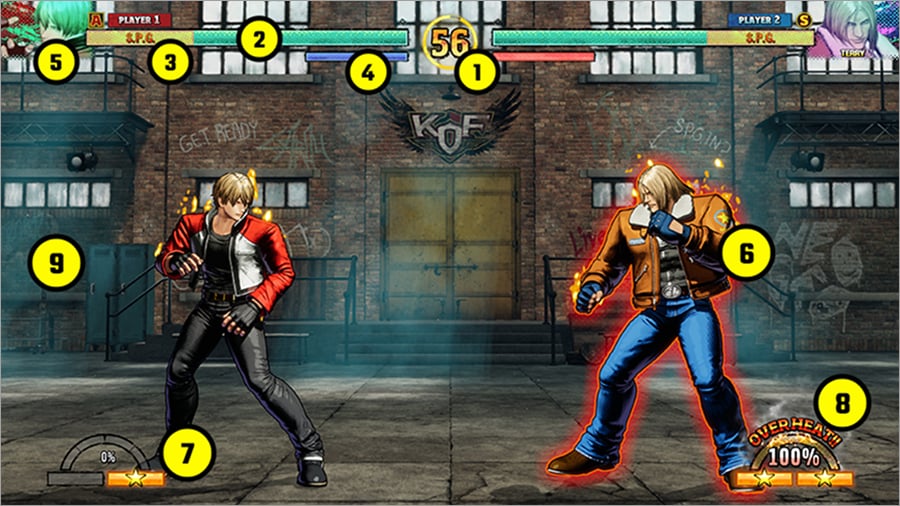
01 Time Counter
The time remaining in the current round. When this timer reaches zero, victory is decided based on the amount of each player's health remaining.
02 Health Gauge
The remaining health of the characters currently fighting. The character whose health reaches zero first loses.
03 S.P.G. Zone
Indicates where S.P.G. has been placed on the health gauge.
The S.P.G. zone changes from blue to yellow when remaining health overlaps with it.
04 Guard Gauge
If you block an opponent while overheated, the gauge will deplete. If the gauge runs out, guard will be crushed.Characters are particularly vulnerable after a guard crush, so be careful!
- (The gauge recovers over time.)
05 Control Scheme
Displays the player's control scheme.
"A" means the player is using Arcade Style controls.
"S" means the player is using Smart Style controls.
06 Character
The character currently fighting.
07 Power Gauge
Fill up this gauge by landing hits, blocking attacks, and so on.
Gauge bars display a star symbol when fully filled.
08 REV Meter
Heats up when using REV Arts (enhanced special moves) and REV Accel, blocking normally, and so on.
Once the gauge maxes out, the character will enter an overheated state and glow red.
09 System Message
Displays when an attack hits during combat or when certain actions are performed.
Example:
 |
The attack was a counter hit. | |
|---|---|---|
 |
The move has invincibility frames. | |
 |
Suffered a guard crush. | |
 |
Remaining health just entered the designated S.P.G. zone. | |
etc.
Pause Menu
Press the Options button to open the pause menu.
Here you can check command lists, remap buttons, and so on.
- * Not available in certain online modes (such as Ranked Match).